Publishing RFXmeter power sensor data to MQTT

More hunting around for helpful modules led me to believe that the easiest way to get data from my RFXmeter sensors into MQTT/mosquitto so it can be read by emoncms was to stick with Perl and use the Device::RFXCOM and Net::MQTT::Simple modules from CPAN. Had there been suitable Python modules available for handling RFXmeter devices I might have gone that way, but at the moment I’m not really of a mind to fix the broken one I found.

It didn’t take much coding effort to come up with this:

!/usr/bin/perl

use warnings;
use strict;
use Device::RFXCOM::RX;
use Net::MQTT::Simple;

my $DEVICE             = '/dev/ttyUSB0';
my $MQTT_HOST          = '<ip-address>';
my $MQTT_PORT          = 1883;
my $MQTT_USER          = 'power';
my $MQTT_PASS          = '<password>';
my $SENSORS_PER_METER  = 3;

# Allow unencrypted connection with credentials
$ENV{MQTT_SIMPLE_ALLOW_INSECURE_LOGIN} = 1;

my $mqtt;

sub
cleanUp
{
  $mqtt->disconnect();
  die "Quitting... $!";
}

my $rx = Device::RFXCOM::RX->new ( device => $DEVICE );

$mqtt = Net::MQTT::Simple->new ( "$MQTT_HOST:$MQTT_PORT" );
$SIG{INT} = \&cleanUp;
$SIG{TERM} = \&cleanUp;

$mqtt->login ( $MQTT_USER, $MQTT_PASS );

while (1) {
  my $data = $rx->read() or next;
  if ( !$data->duplicate ) {
    if ( $data->type eq 'rfxmeter' ) {

      # I'm expecting something like:
      #
      # 'messages' => [
      #   bless( {
      #     'measurement' => 'count',
      #     'device' => 'rfxmeter.02f2',
      #     'value' => 448770
      #   }, 'Device::RFXCOM::Response::Sensor' )
      # ],

      foreach my $msg ( @{$data->messages} ) {
        if ( $msg->{measurement} eq 'count' ) {
          if ( $msg->{device} =~ /rfxmeter.([0-9a-f]{2})[0-9a-f]{2}/ ) {
            # this works for me because my sensors appear to be numbered
            # 00f0, 01f1, 02f2, 03f3 and 04f4, the first three being on the
            # first RFXmeter and the last two being on the second.
            my $sensorNum = hex ( $1 );
            my $meterNum = int ( $sensorNum / $SENSORS_PER_METER ) + 1;
            $sensorNum %= $SENSORS_PER_METER;
            my $sensorName = "rfxmeter$meterNum-$sensorNum";
            $mqtt->publish ( "sensors/$sensorName/count", $msg->{value} );
          } else {
            print "failed match\n";
          }
        }
      }
    }
  }
}

If I connect to mosquitto in another window, using:

mosquitto_sub -h <ip-address> -v -t sensors/#

and run the above script, I get output of the form:

sensors/rfxmeter1-0/count 784628
sensors/rfxmeter1-1/count 373203
sensors/rfxmeter1-2/count 451528
sensors/rfxmeter1-0/count 784648
sensors/rfxmeter1-1/count 373213
sensors/rfxmeter1-2/count 451536
sensors/rfxmeter2-0/count 0
sensors/rfxmeter2-1/count 43623

which looks good to me.

Now I need to go back to emoncms and see if I can confirm that it is picking up the same data, but first I shall rename the sensors as I suggested towards the end of my previous post on this topic.
Posted in Computing | Tagged , , , | Leave a comment

Swimming, 16th December 2021

My shoulders felt very tired whilst I was warming up today so I wasn’t expecting to achieve much, but actually it didn’t turn out too badly in the end. I did fail two of my 50m reps, but the first failure was on rep 12, so one better than yesterday.

The 25m reps were quite a struggle afterwards though. By that time things were catching up with me a bit I think and I had two fails in this set as well. I can be happy with this performance given the situation though. It’s always a little tough coming back after being ill, even if it’s only mildly ill.

Posted in Swimming | Tagged , | Leave a comment

Adding support for new devices to emoncms

To be clear: I’m not certain this is the right way to go about this. It’s mostly based on guesswork and assumption from what I’ve scraped together reading around the discussions about emoncms. For the moment it appears to be working for me and that’s the best I can say. If you try the same and it blows up in your face, sets your hair on fire, eats your firstborn and sells your soul to Santa, I’m afraid there are no refunds. So, here we go…

The way to start once logged into the application is to create devices having selected that section from the menu on the left-hand side of the main page, but that appears to be much more straightforward if there are device templates to work with. After checking over a few of the existing templates, I realised that perhaps the system isn’t going to work as well as I’d like for the RFXcom units that may receive messages from multiple RFXmeters at once, so I decided to treat each sensor connected to an RFXmeter (which may have one, two or three connected) as a separate device. In the end, this is what I came up with:

{
  "name": "single-input RFXmeter",
  "category": "RFXcom",
  "group": "Power",
  "description": "1-input RFXmeter",
  "inputs": [
    {
      "name": "count",
      "description": "CT Power 1",
      "processList": [
        {
          "process": "log_to_feed",
          "arguments": {
            "type": "ProcessArg::FEEDID",
            "value": "power"
          }
        }
      ]
    }
  ],
  "feeds": [
    {
      "name": "power",
      "engine": "Engine::PHPTIMESERIES",
      "unit": "Wh"
    }
  ]
}

“name” (on the first line) is the entry that will appear in the devices menu for this specific template. “category” is the top-level menu item that it will appear under. In this case I’ve used the name of the company producing the device. “group” appears as a sub-menu of the category, so there might be RFXcom units for measuring gas and water use, say, and they could appear in the same category with different group names. Or a different RFXmeter configuration might appear under the same group as my new device.

As I’m treating each meter input as a separate device there’s only one entry in the “inputs” section. There, I believe “name” is the third element of the topic name to use with MQTT to retrieve data for this sensor, so the full value would be sensors/rfxmeter1/count for example. I’ve used the name “count” because that’s what the RFXcom units call the values they send.

The rest of the entry for this input details how to deal with the data:

      "processList": [
        {
          "process": "log_to_feed",
          "arguments": {
            "type": "ProcessArg::FEEDID",
            "value": "power"
          }
        }
      ]

In this case it’s going to be delivered to a “feed” so it can be turned into graphs and suchlike, and the arguments are just indicating that the “log_to_feed” process should be given a feed ID of “power”. That ID is the one that’s used as a name in the “feeds” section of the configuration:

  "feeds": [
    {
      "name": "power",
      "engine": "Engine::PHPTIMESERIES",
      "unit": "Wh"
    }
  ]

The options for “engine” appear to be Engine::PHPFINA for data that is delivered at regular intervals, or Engine::PHPTIMESERIES where it may be delivered randomly. As the data I’m getting can be a bit variable if the radio signals from the RFXmeter unit aren’t clear, I chose the latter. And in the case of the RFXmeter values, they’re watt-hours rather than kilowatt-hours, so I’ve made that clear in the “unit” field.

This file now needs adding into the Docker image. The existing templates appear to be stored in /var/www/emoncms/Modules/device/data. Looking at the existing image I suspect the directory names may be important, too, so at the top level of my copy of the emoncms Docker project I created a new directory devices/RFXcom. I also suspect the template filenames are important, so in that directory I put the above template file, named rfxcom-rfxmeter-1.json. I believe the first component of the filename (before the “-“) must match the directory name, but be in lower case. It’s possible the end directory name must also match the category name in the template file. I don’t know that for certain, but it looks like that might be the case with the other templates, so I kept to the same form.

Then it’s just a case of copying these files into the Docker image when it is created, which I did by adding the second COPY line in this section of the Dockerfile:

COPY docker.settings.ini /var/www/emoncms/settings.ini

COPY devices/* /var/www/emoncms/Modules/device/data

# Create folders & set permissions for feed-engine data folders (mounted as docker volumes in docker-compose)

After recreating the image and logging in again I was then able to go through the usual device creation process using my own template. I actually went through the process of adding my five power sensors as rfxmeter1, rfxmeter2, rfxmeter3, etc., but in retrospect I think I’ll rename them along the lines of “rfxmeter<meter-number><sensor-number>” so it’s clear which sensor input is associated with each RFXmeter unit.

The next stage would appear to be to start pushing data from the sensors into MQTT and see what happens. Life is never simple though, is it?

Presently I am reading data from the RFXcom unit using Perl and a module that can decode the data sent. Unfortunately there doesn’t seem to be a confidence-inspiring MQTT module for Perl. Python might be an alternative as it does have good MQTT integration, but the only RFXcom module I can find doesn’t work with versions of python after 3.6. I have discovered that there’s a set of Node-RED nodes that might possibly do everything for me, but that seems like a massively over-engineered way to read some data from a serial port, decode it and post it to an MQTT topic and I don’t know it would work for certain anyhow. More investigation is required here…

Posted in Computing | Tagged , | Leave a comment

Setting up emoncms in Docker

As I posted earlier, there’s a github project for setting up emoncms in Docker, but the configuration assumes that a MySQL instance will be set up in a second Docker image and everything built together with docker-compose, which wasn’t what I wanted. I already have MySQL running on the host machine with MythTV and I wanted to use that.

Fortunately, having cloned the project it’s fairly straightforward to get things moving in the right direction. I edited the Dockerfile to add these ENV entries immediately after the FROM, which really isn’t the way to do it and keep your passwords secure, but it will do for me for the moment as I don’t need to share the Docker image anywhere:

ENV MYSQL_HOST=<ip-address>
ENV MYSQL_PORT=3306
ENV MYSQL_DATABASE=emoncms
ENV MYSQL_USER=emoncms
ENV MYSQL_PASSWORD=<password>
ENV REDIS_ENABLED=false
ENV REDIS_HOST=''
ENV REDIS_PORT=6379
ENV REDIS_PREFIX='emoncms'
ENV MQTT_ENABLED=true
ENV MQTT_HOST=<ip-address>
ENV MQTT_USER=emon
ENV MQTT_PASSWORD=<password>
ENV MQTT_BASETOPIC=sensors
ENV PHPFINA_DIR=/var/opt/emoncms/phpfina/
ENV PHPTIMESERIES_DIR=/var/opt/emoncms/phptimeseries/

I changed the topic that emoncms uses to be a bit more intuitive for my use case.

After rebuilding the image I created two local directories, /var/lib/emoncms/phpfina and /var/lib/emoncms/phptimeseries to store some of the data because I think I’d prefer to have it persist over restarts of the container rather than disappear. So my current way to start the package is:

docker run -it -p <ip-address>:80:80 -v /var/lib/emoncms:/var/opt/emoncms emoncms

I’ll put together a systemd configuration for that shortly.

After connecting to the IP address in a browser (which I also need to think about more as perhaps it should have an SSL certificate) I created an account and was then faced with working out what to do next. It really wasn’t clear how I might add sensors of my own into the system. There are templates for some existing devices, but I struggled to find much that was clear regarding how to set up completely new ones. That will be the next step.

Posted in Computing | Tagged , , | Leave a comment

Swimming, 15th December 2021

Having taken Monday off because I didn’t feel great I went back to the pool today not really knowing what to expect. As it turned out, my 50m reps weren’t that bad and I only failed one, though I did get the timing messed up at some point and I can’t recall now if that was rep 10 or rep 11. I’m happy enough at this stage only to have missed one though.

Unfortunately by the time I got to the 25m reps I was absolutely shattered and they were very tough. In fact I didn’t finish the set and missed my target time on three or four. I can live with that though. It’s clear that I was working hard to make the 50m reps and tiredness just crept in towards the end of the session. Hopefully it will be better tomorrow.

Posted in Swimming | Tagged , | Leave a comment

The power monitoring plan is coming together

As I may want to use power consumption data (and other information, such as data from the weather station) in a number of different applications, I’ve come to the conclusion that MQTT may be a way forward, allowing those applications that way the data to subscribe to the relevant topics to get it. Specifically, I’m looking at using Mosquitto. I already have a server running all the time for MythTV, so that seems like a logical place to run it.

I’m a little behind the curve with containers and related technology so I thought I’d explore the possibility of using Docker for some of the components I need to get everything up and running. I’m thinking I’ll do that for anything that doesn’t need direct access to hardware.

Happily there’s an existing Docker image for Mosquitto that I can use which makes things fairly straightforward, though I did have one little niggle getting it to run initially. The documentation on the linked page suggests running it using:

docker run -it -p 1883:1883 -p 9001:9001 -v mosquitto.conf:/mosquitto/config/mosquitto.conf -v /mosquitto/data -v /mosquitto/log eclipse-mosquitto

but when I did that I was getting errors about mosquitto.conf not being a directory, so I checked to see if there were any other files in the image’s /mosquitto/config directory (there weren’t) and decided to change the command to:

docker run -it -p 1883:1883 -p 9001:9001 -v /etc/mosquitto:/mosquitto/config -v /mosquitto/data -v /mosquitto/log eclipse-mosquitto

That allowed me to have a copy of the config file on the host system that I could work with, but also allowed me to add acl files and password files in the same place.

Then I realised that to test from the host system (currently Ubuntu 20.04) I also needed to install the mosquitto package which wants to put its config files in the same place, so I moved mine to /etc/mosquitto.docker and updated the docker command accordingly:

/usr/bin/docker run --rm -t -p 1883:1883 -p 9001:9001 -v /etc/mosquitto.docker:/mosquitto/config -v /mosquitto/data -v /mosquitto/log eclipse-mosquitto

then installed the mosquitto and mosquitto-clients packages.

Testing looked good, so the final stage was to get the container up and running at boot time using systemd. As I may wish to move the container elsewhere at some point in the future I bound a spare IP address to the host server’s network interface and came up with the following configuration which I put in /etc/systemd/system/docker-mosquitto.service

[Unit]
Description=Mosquitto Container
After=docker.service
Requires=docker.service

[Service]
TimeoutStartSec=0
Restart=always
ExecStartPre=-/usr/bin/docker stop eclipse-mosquitto
ExecStartPre=-/usr/bin/docker rm eclipse-mosquitto
ExecStartPre=/usr/bin/docker pull eclipse-mosquitto
ExecStart=/usr/bin/docker run --rm -t -p <ip-address>:1883:1883 -p <ip-address>:9001:9001 -v /etc/mosquitto.docker:/mosquitto/config -v /mosquitto/data -v /mosquitto/log eclipse-mosquitto

[Install]
WantedBy=multi-user.target

In truth this probably isn’t perfect as it may not restart properly should the instance fail, but right now I’m more concerned about having it start cleanly at boot time than what happens if something breaks.

sudo systemctl daemon-reload
sudo systemctl start docker-mosquitto

started everything and testing again pointed to everything being good, so I think for the time being I’m done.

I’m looking at using emoncms from the Open Energy Monitor project to display power data as it appears to be able to grab inputs from MQTT, so getting that up and running together and probably having to write some code (the horror!) to read and submit the data are probably the next steps. It looks as though there’s a project to create a Docker image for that too, though it seems to be tied up with using MySQL in a second image which I don’t want to do as I already have MySQL running on the host server for MythTV and I’d prefer to use that for my database.

Posted in Computing | Tagged , | Leave a comment

Tonight Matthew, I am Dremel repair man

I posted a few days ago that my Dremel 4000 had died and that I suspected the thermal fuse to be the cause. Here’s how I fixed it.

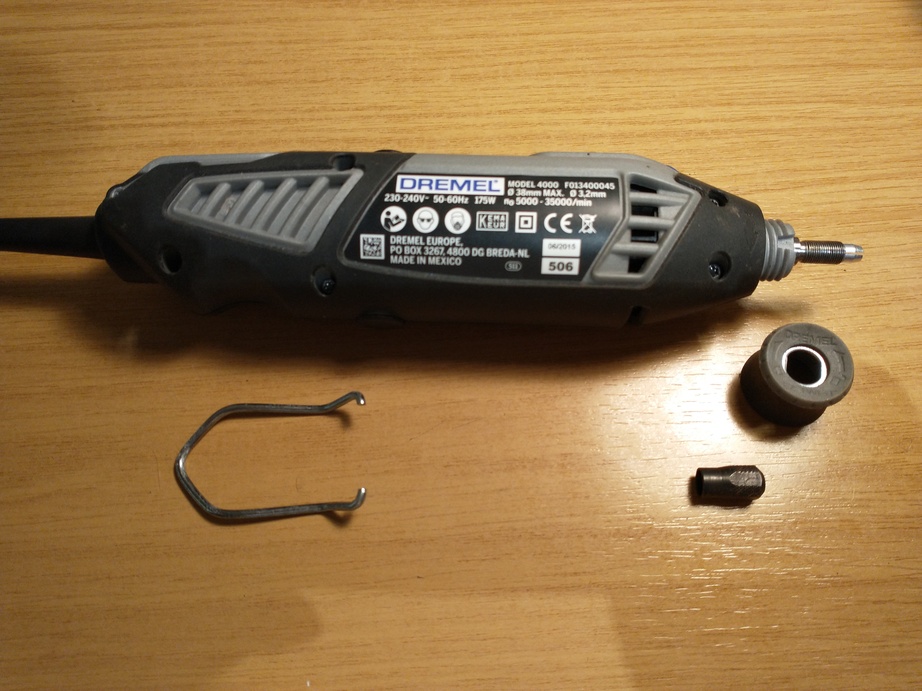
The first steps to getting inside the case are to remove the folding clip, the collet and the collar on the end of the body behind the collet. It may be possible to remove the collar without removing the collet, but when it’s so easy to get the collet off, why make things difficult?

The five Torx screws holding the case together can then be removed and that side of the case gently prised off. There are a few small parts that may go “ping” at this point. In particular the two brush holder covers (small black plastic caps about halfway down the body of the tool) and the brushes they retain, and the locking button for the shaft near the nose of the tool. So a wise person probably does this bit where such parts won’t disappear down the back of a cupboard and never be seen again ๐Ÿ™‚

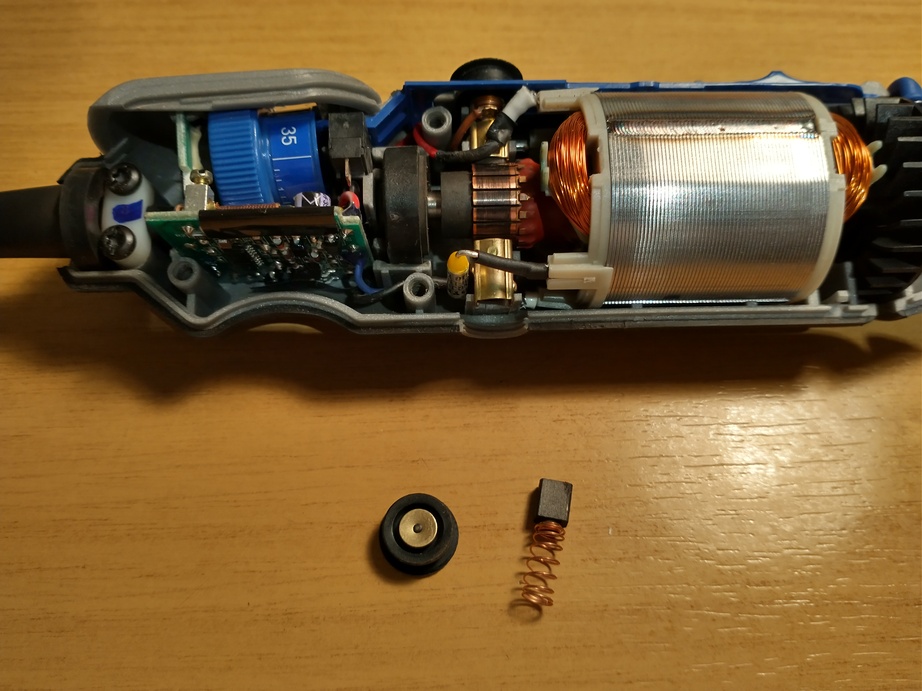
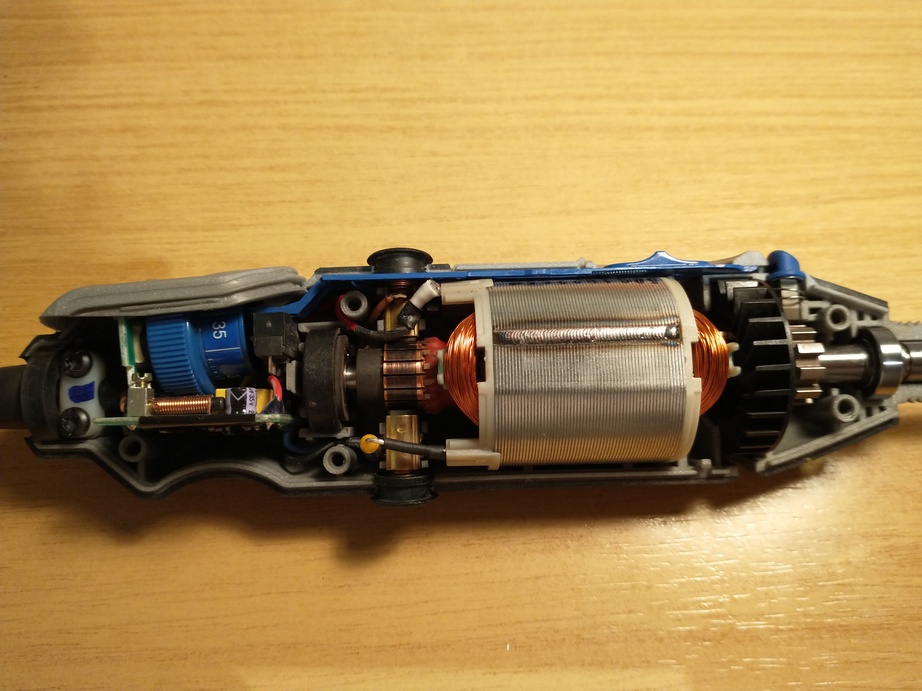
Hopefully that leaves you with a view somewhat similar to this:

At this point it’s probably easiest to remove the lower brush cover and the brush itself (the ones on the opposite side to the speed control and power switch).

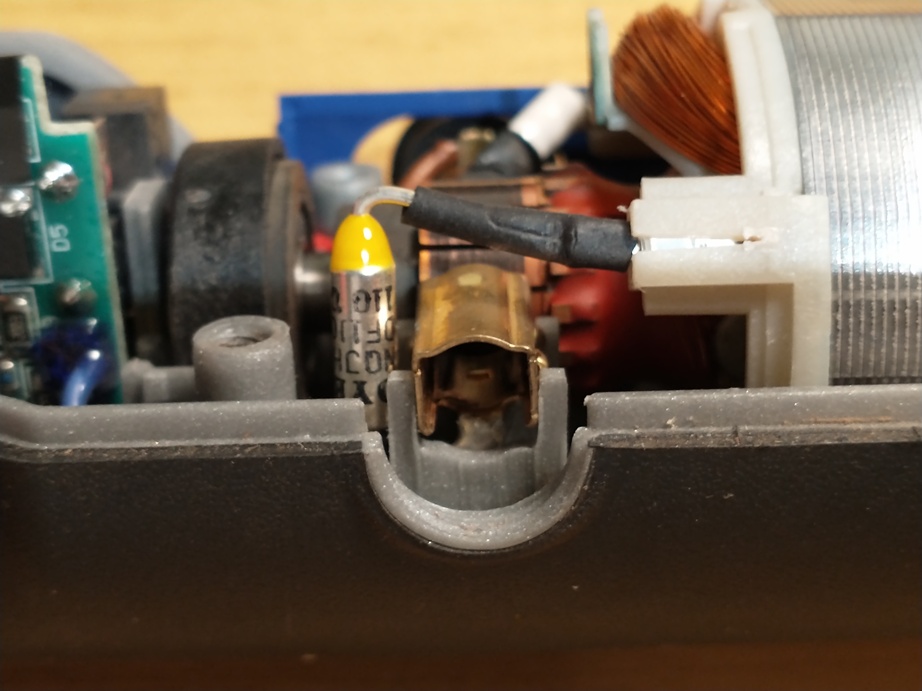
This allows comfortable access to the brush holder and the attached fuse (the silver coloured part with the yellow end in this photo).

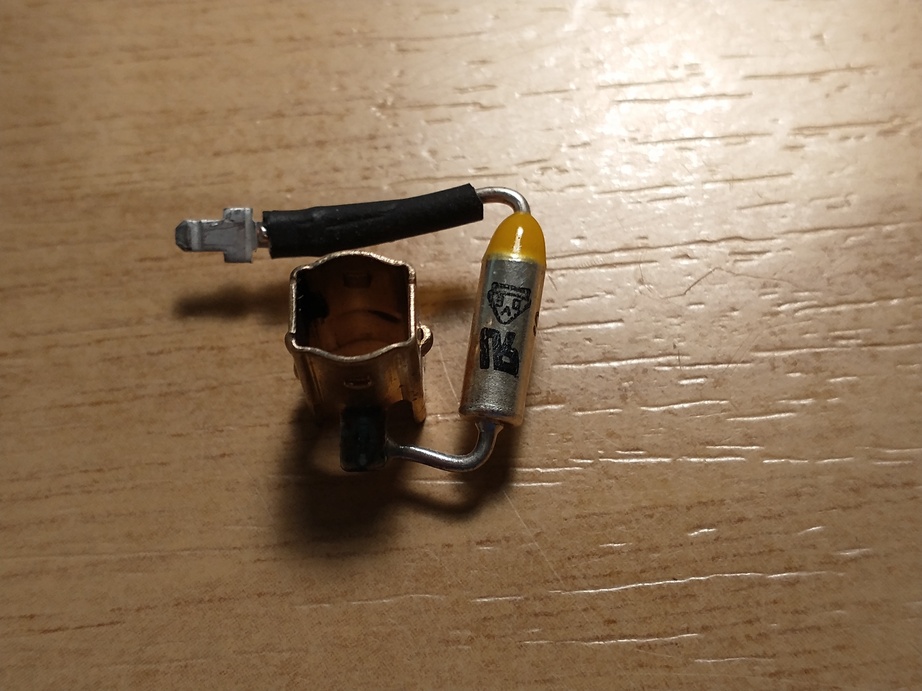
A multimeter placed across the brush holder and the wire coming out of the yellow end of the fuse in continuity-testing mode should indicate whether the fuse has failed or not. If it conducts then the problem lies elsewhere. In my case it didn’t. The fuse and brush holder are supplied as a single part when ordering spares which makes replacement quite straightforward. The fuse connects to the motor with a small spade connector that can be pulled out carefully and then the two parts just lift away.

The spares sites I found for ordering replacements had exploded diagrams of the tool with all the parts numbered. It wasn’t entirely obvious from the description alone that one brush holder just has a fly lead with a spade connector on the end whilst the other has the thermal fuse. They were both just described as “brush holder”. It’s therefore important to use the diagram to make sure you get the right part. Another clue is that the one with the thermal fuse is the more expensive of the two. I’d hazard a guess that the other brush holder might actually work were it to be fitted instead, but you’d end up with a Dremel with no protection from overheating. If you’re the kind of person who treats their tools with care and good sense then that might not be a problem. If you’re the kind of cack-handed ape whose screwdrivers often double as removal tools for oil filters then you’re probably better off keeping the thermal fuse ๐Ÿ˜€

Reassembly with the new part is, as they say in all the good servicing manuals, just the reverse of disassembly ๐Ÿ™‚ Take care not to trap wires between the brush holder and body of the tool though. They should fit into the gaps in the moulding. And be sure to get the orientation of the brush correct when it is put back in, so it makes proper contact with the commutator. The end of the brush is curved where it fits against the surface of the commutator.

Posted in Workshop | Tagged | 1 Comment

Piano, four days in

I’ve been practising every day and the simple stuff seems to be coming more easily now, but it’s far too early to make a decision between the two books I’ve been reading to learn. Andrew Furmanczykโ€™s videos I’m losing faith with a little. Partly I think he’s just not my style, but also I’m not yet sure where it’s all going — there seems to be a lot of information, but not a lot of “glue” to put it all together that makes for meaningful learning. I’ll stick with them for a while yet though.

One other source of online lessons I’ve found is another set of YouTube videos by Bill Hilton. He has a “How to play piano for beginners” playlist as well as a lot of other stuff that might come in handy one day. I’ve only watched the first one so far, but he seems more direct and perhaps a little more to my taste. I’ll certainly watch a few more to see how they go.

Posted in Learning piano, Projects | Leave a comment

Swimming, 12th December 2021

Another no-so-great performance today. Better than Thursday, but not at the level I was at prior to that. Tiredness still affecting me I think, or my daughter’s cold. I stuck with it though, just because I didn’t want to leave the session early.

Posted in Swimming | Tagged , | Leave a comment

Swimming, 9th December 2021

Well, today was just awful ๐Ÿ™

I’m still not sleeping well and I think today was the day the tiredness chose to make itself known. Either that or I’m getting the cold that my daughter currently has and my body just hasn’t let me know yet.

I barely had a single 50m rep below my target time and had failed three by the time I’d been in the water half an hour so decided that wimping out was the better part of valour and went home.

Perhaps the cause will become obvious over the next few days.

Posted in Swimming | Tagged , | Leave a comment